MDM Web AdminDevice Control Preview
ดูภาพตัวอย่าง Web Admin จริงของ ME2TECH MDM ตั้งแต่ iOS Dashboard, Device Detail, Location Preview, Policy Template, App Whitelist, Push Command และ Command History
ลูกค้าเห็น Journey การคุมเครื่องได้ทันที
ภาพตัวอย่างจาก Web Admin จริงช่วยให้ลูกค้าเข้าใจว่า ME2TECH MDM ไม่ได้มีแค่คำสั่ง Lock/Wipe แต่มี Dashboard, Device Detail, Location Preview, Policy Template, App Whitelist และ Command History ครบ flow
เห็นภาพรวมเครื่อง
ดูจำนวน iPhone/iPad, สถานะ Online/Offline, APNs readiness, OS version และคำสั่งล่าสุดในหน้า Dashboard
เปิดหน้าเครื่องรายตัว
ตรวจ Serial, UDID, OS, Enrollment, Last Seen และประวัติคำสั่งของเครื่องแต่ละเครื่อง
เลือก Policy ที่ต้องการ
เปิด Wipe Shield, App Blocker, Camera Lock, Safari Blocker, VPN Creation Blocker หรือ Policy อื่นตามงานจริง
สั่ง Command แล้วดูผล
ส่ง DeviceInformation, InstallProfile, RemoveProfile หรือ Location Sequence แล้วตรวจผล Acknowledged / NotNow

Dashboard ภาพรวม iOS MDM
- ดูจำนวน iOS Devices ทั้งหมดใน Tenant
- เช็กเครื่องที่ Online ในช่วง 5 นาทีล่าสุด
- เห็นจำนวนเครื่อง ABM / DEP และเครื่อง Supervised
- เหมาะกับผู้จัดการที่อยากรู้สถานะรวมก่อนลงรายละเอียด
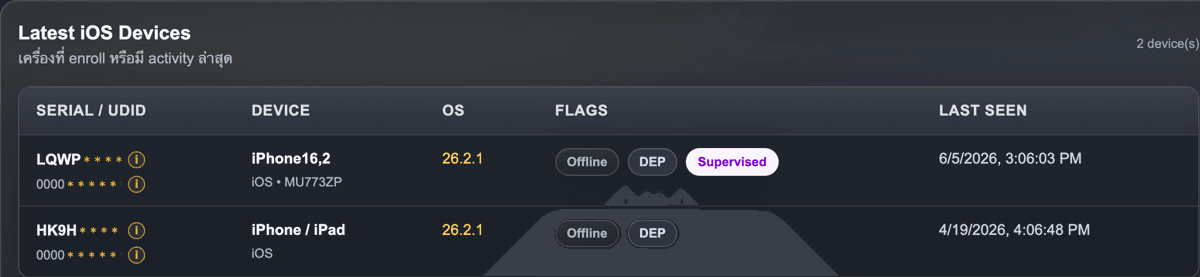
Device List รายชื่อเครื่อง
- เห็น Serial / UDID เพื่ออ้างอิงกับเครื่องจริง
- ดูรุ่นเครื่องและ iOS version
- แยกสถานะ Offline, DEP, Supervised ได้เร็ว
- ใช้เลือกเครื่องก่อนเปิดหน้า Device Control
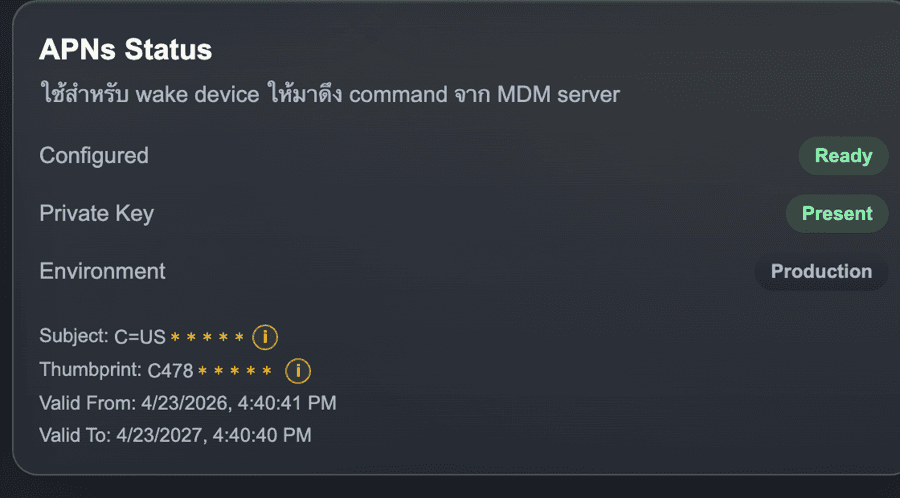
APNs Status ความพร้อม Push Command
- ยืนยันว่า APNs พร้อมปลุกเครื่องให้มาดึงคำสั่ง
- เห็นสถานะ Private Key และ Environment
- ตรวจวันหมดอายุ certificate ได้จากหน้าเดียว
- ช่วยลดความสับสนเวลาสั่ง command แล้วเครื่องไม่ตอบ
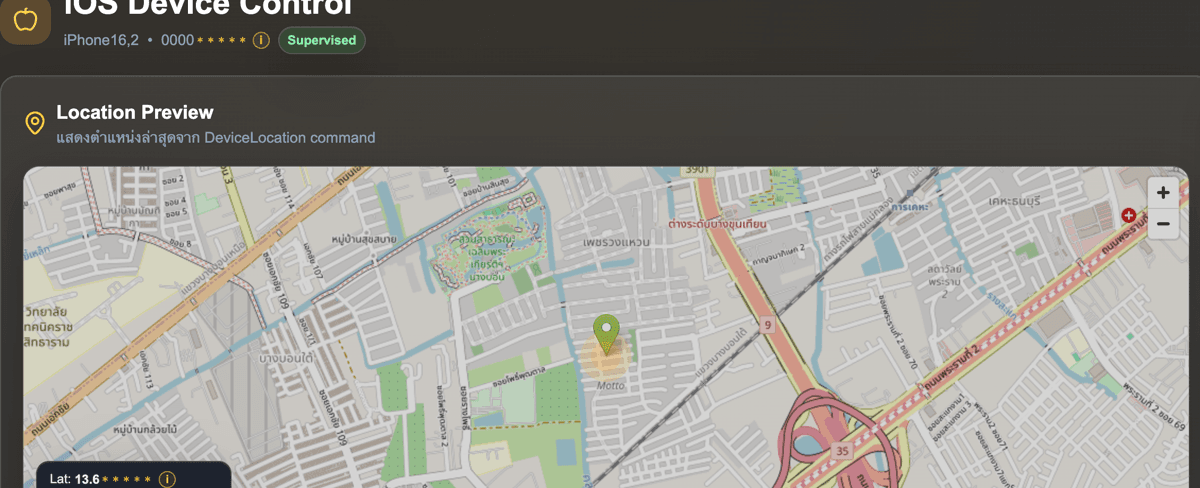
Location Preview ตำแหน่งล่าสุด
- แสดงตำแหน่งล่าสุดจาก DeviceLocation command
- เห็น Lat / Lng และค่าความแม่นยำ
- ใช้ประกอบกรณีเครื่องหายหรือเครื่องเช่าที่ต้องติดตาม
- ทำให้ลูกค้าเข้าใจ flow Location Sequence ได้ง่ายขึ้น
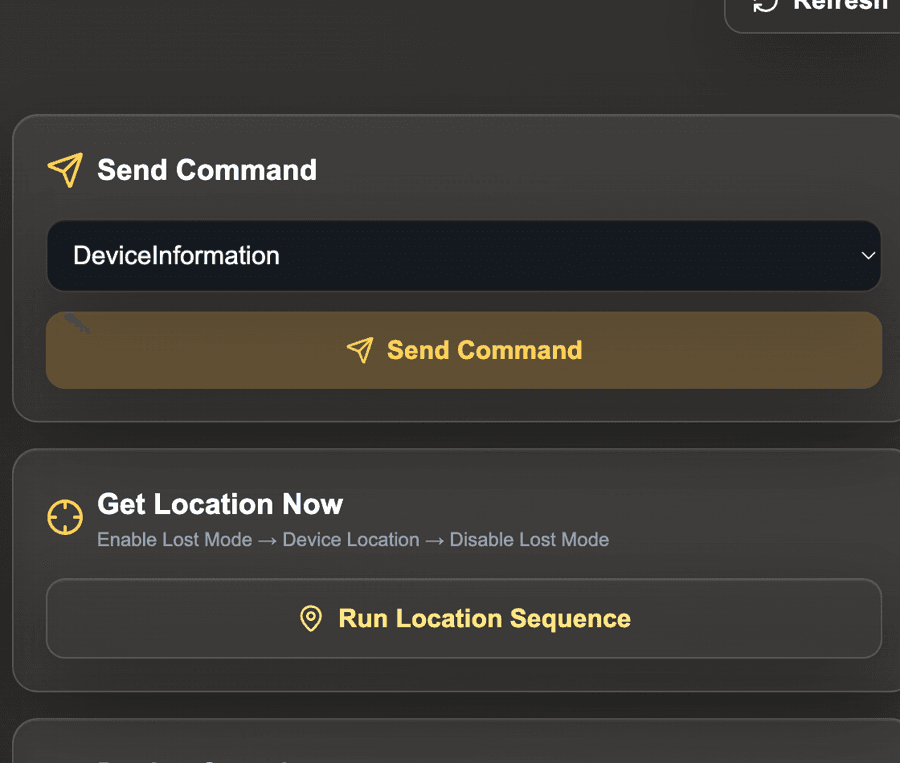
Send Command และ Device Overview
- เลือกคำสั่ง เช่น DeviceInformation แล้วกด Send Command
- มีปุ่ม Run Location Sequence สำหรับเรียกตำแหน่ง
- เห็น OS, Enrollment, Lost Mode และ Last Seen
- เหมาะกับทีม support ที่ต้องแก้เคสทีละเครื่อง
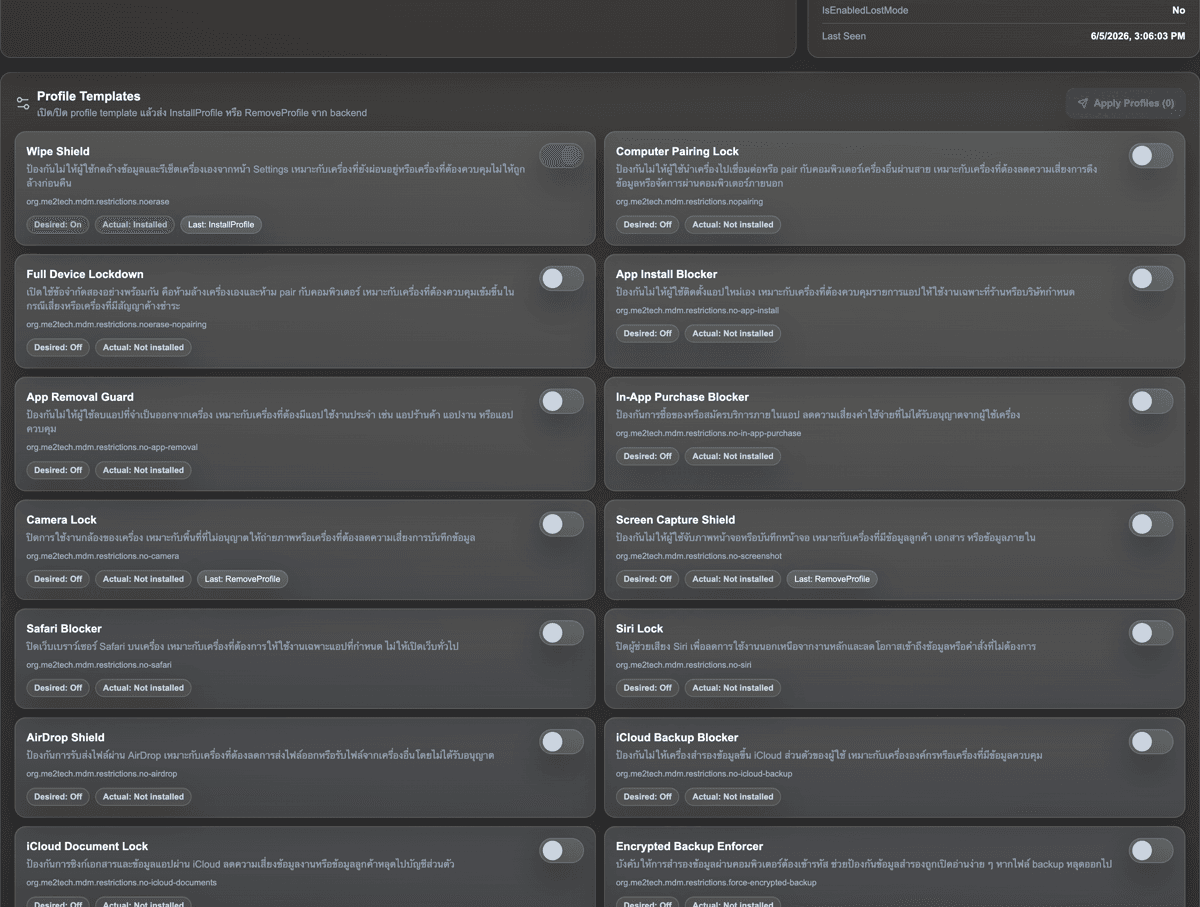
Policy Template คุมความปลอดภัย
- เปิด/ปิด policy ด้วย template ที่เข้าใจง่าย
- ตัวอย่างเช่น Wipe Shield, App Install Blocker, Camera Lock
- เห็น Desired state, Actual state และคำสั่งล่าสุด
- ช่วยอธิบายลูกค้าว่า MDM ทำได้มากกว่า Lock/Wipe
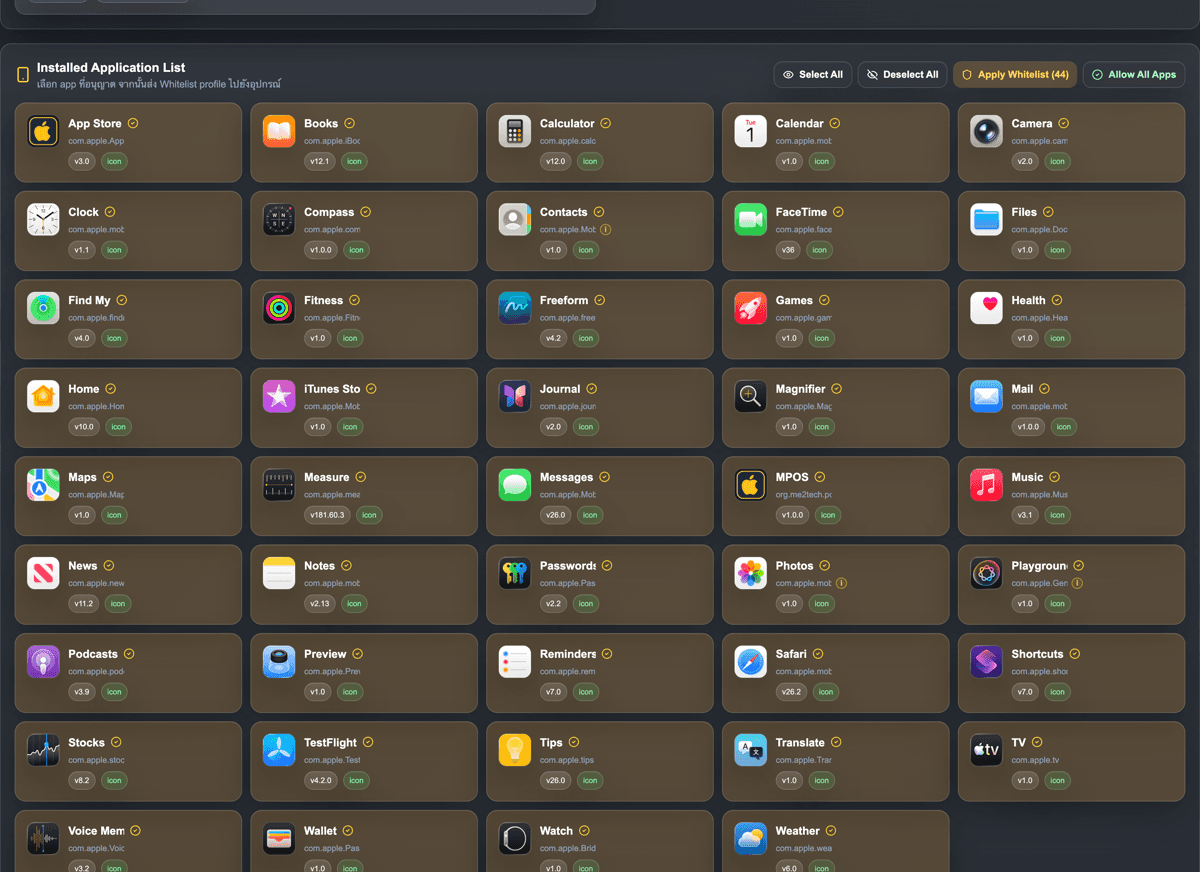
App Whitelist เลือกแอปที่อนุญาต
- เห็นรายการแอปในเครื่องพร้อม icon และ bundle id
- เลือก Allow Apps หรือ Apply Whitelist ได้
- เหมาะกับเครื่อง POS, เครื่องพนักงาน หรือเครื่องเฉพาะงาน
- ลดปัญหาพนักงานใช้แอปนอกเหนือจากที่บริษัทกำหนด
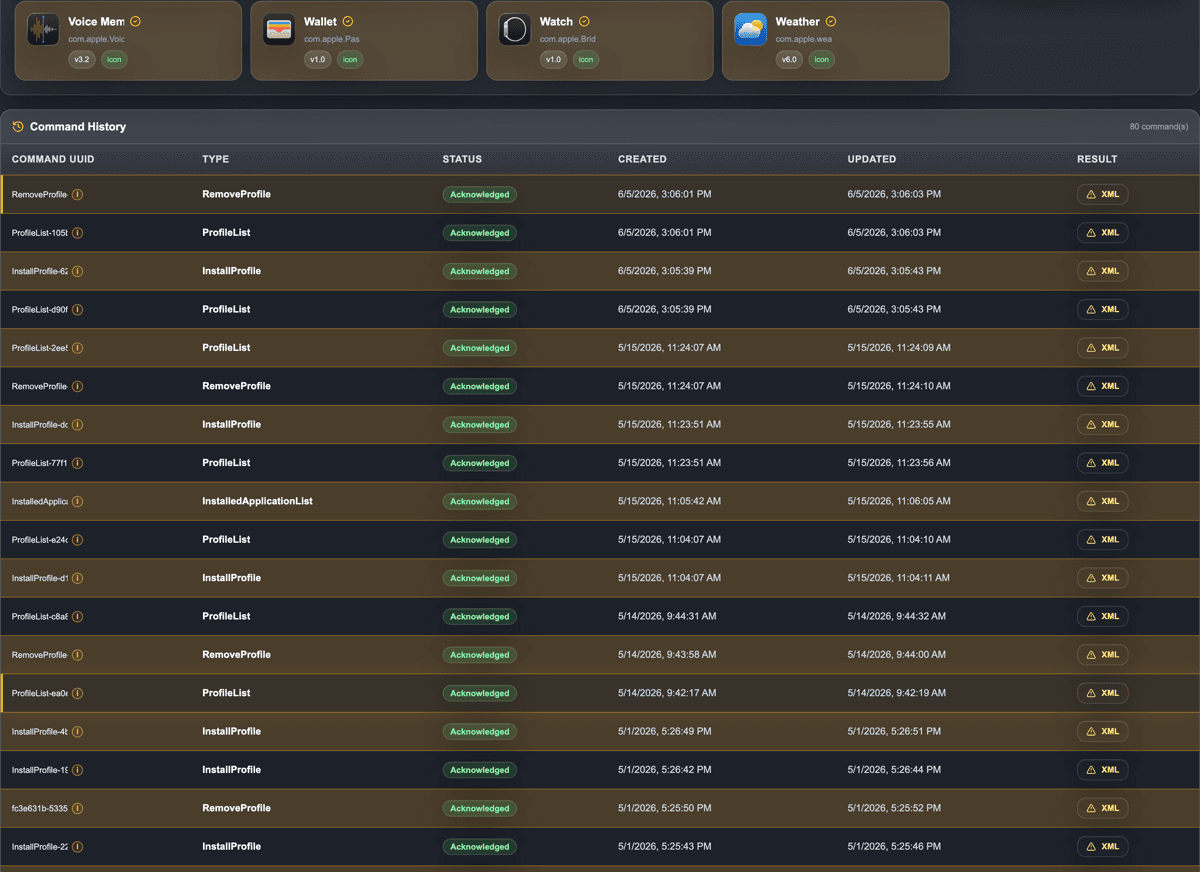
Command History ตรวจผลย้อนหลัง
- ดูว่า command สำเร็จหรือยัง เช่น Acknowledged / NotNow
- เห็นเวลาสร้างคำสั่งและเวลาที่เครื่องตอบกลับ
- เปิด XML result เพื่อตรวจข้อมูลเชิงเทคนิคได้
- ช่วยให้ลูกค้ามั่นใจว่ามีหลักฐานการทำงานย้อนหลัง
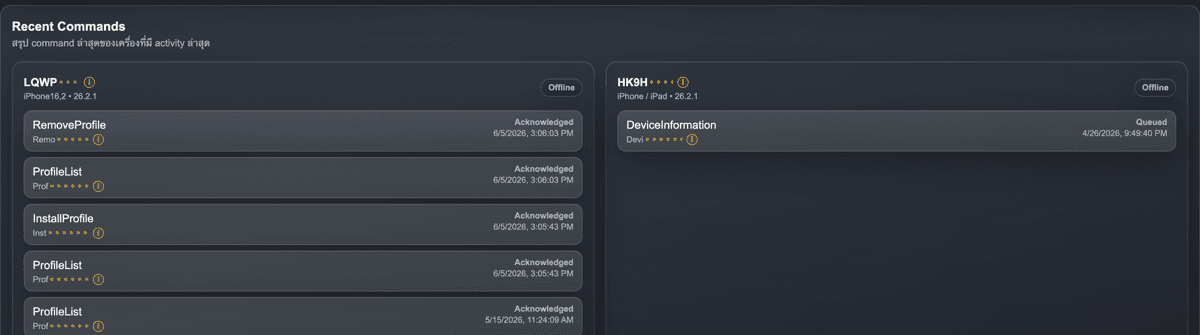
Recent Commands สรุปงานล่าสุด
- เห็นคำสั่งล่าสุดของแต่ละเครื่องตั้งแต่หน้า Dashboard
- ดูได้ทันทีว่าเครื่องไหนเพิ่ง InstallProfile หรือ RemoveProfile
- ช่วยทีม support ไล่เหตุการณ์ก่อนเปิด detail เครื่อง
- เหมาะกับการอธิบายลูกค้าว่าระบบมี activity trail ตั้งแต่หน้าแรก
Apple Configurator
เตรียมเครื่อง iPhone/iPad ผ่าน Apple Configurator หรือ ABM/ADE profile เพื่อเข้าสู่ flow การจัดการอุปกรณ์
Enroll Device
ติดตั้ง MDM Profile และให้เครื่อง check-in เข้าสู่ ME2TECH MDM Server พร้อมบันทึก UDID, Serial, Model และ OS Version
Push Command
Admin สั่งคำสั่ง เช่น SecurityInfo, DeviceInformation, ProfileList, Lock หรือ Erase จาก Tenant Portal
APNs Wake
ระบบส่ง APNs MDM Push เพื่อปลุกอุปกรณ์ให้กลับมาดึงคำสั่งจาก /mdm/server
Pull Result
อุปกรณ์ Pull command จาก MDM Server แล้วส่งผลลัพธ์กลับมา เช่น Acknowledged, NotNow, Error หรือข้อมูล payload
วิดีโอสาธิตแต่ละ Step
แสดงขั้นตอนจริงของ ME2TECH MDM ตั้งแต่ Apple Configurator, Enroll Device, Push Command และ Pull Result
Apple Configurator
เตรียมเครื่อง iPhone/iPad ผ่าน Apple Configurator
Enroll Device
ติดตั้ง MDM Profile และ Check-in เข้า ME2TECH MDM
Push Command
Admin สั่ง Command จาก Tenant Portal
Pull Result
Device Pull Command และส่งผลลัพธ์กลับ Server
Prepare Device
Enroll Device Result
| Command UUID | Request Type | Device | Status | Duration |
|---|---|---|---|---|
| SecurityInfo-822c580d | SecurityInfo | iPhone 15 Pro Max | Acknowledged | 00:00:18 |
| ProfileList-91fd22ac | ProfileList | iPhone 15 Pro Max | Acknowledged | 00:00:23 |
| DeviceInfo-a7c21d90 | DeviceInformation | iPad 10th | Acknowledged | 00:01:12 |
| InstallProfile-c03f81aa | InstallProfile | iPhone 14 | NotNow | 00:02:40 |
01<plist version="1.0">02 <dict>03 <key>Status</key>04 <string>Acknowledged</string>05 <key>UDID</key>06 <string>00008130-001651612193803A</string>07 <key>CommandUUID</key>08 <string>SecurityInfo-822c580d</string>09 <key>SecurityInfo</key>10 <dict>11 <key>HardwareEncryptionCaps</key>12 <integer>3</integer>13 <key>PasscodePresent</key>14 <true/>15 </dict>16 </dict>17</plist>
Push Command Demo
พร้อมเปิด Tenant MDM แล้วหรือยัง?
เริ่มต้นเช่าใช้งาน MDM สำหรับ iPhone, iPad และ Android พร้อมให้ทีม ME2TECH ช่วยตั้งค่า Tenant, ABM, APNs และ Enrollment Flow